
A strong Google Business Profile helps customers find your business fast. It improves visibility on Google Search and Maps. Many businesses set up a profile but never optimize it. That limits traffic and leads. If you need expert help, explore our local SEO solutions at Walez SEO.
This guide shows how to optimize your Google Business Profile step by step. You will learn how to improve rankings, attract local customers, and build trust. The process follows best practices from Google Search Central.
A well-optimized profile sends clear signals to Google. It shows accurate business details, strong reviews, and active updates. These signals help your business appear in the local pack and map results.
Why Your Google Business Profile Matters
Your Google Business Profile controls how your business appears on Google Search and Maps. It often shows before your website. That makes it a key touchpoint for local customers.
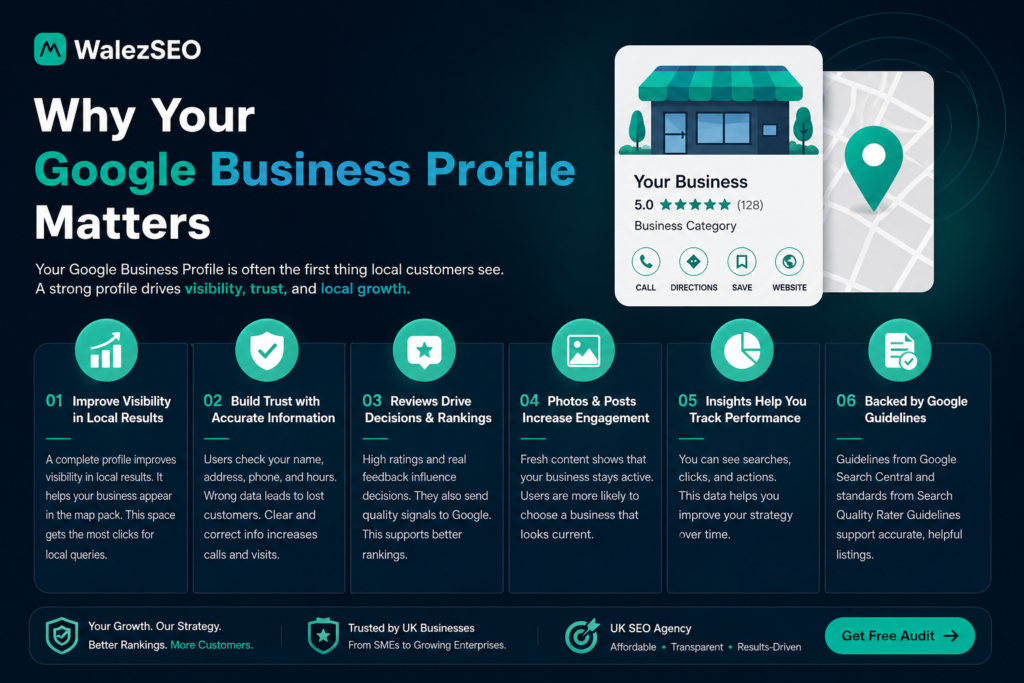
A complete profile improves visibility in local results. It helps your business appear in the map pack. This space gets the most clicks for local queries.
Accurate details build trust. Users check your name, address, phone, and hours. Wrong data leads to lost customers. Clear and correct info increases calls and visits.
Reviews play a major role. High ratings and real feedback influence decisions. They also send quality signals to Google. This supports better rankings and strengthens your local SEO services strategy.
Photos and posts increase engagement. Fresh content shows that your business stays active. Users are more likely to choose a business that looks current.
Insights help you track performance. You can see searches, clicks, and actions. This data helps you improve your strategy over time.
Guidelines from Google Search Central and standards from Search Quality Rater Guidelines support accurate, helpful listings.
A strong profile drives visibility, trust, and local growth.
Step 1 – Complete Every Business Detail Accurately
Your Google Business Profile must show clear and correct information. Google uses this data to rank your business in local results.
Add these details with care:
- Business name exactly as used in real life
- Full address with correct location pin
- Active phone number
- Website URL
- Business hours, including holidays
Keep your Name, Address, and Phone consistent across all platforms. This is known as NAP consistency in local SEO.
Small mistakes create confusion. Wrong details reduce trust and lower visibility. Users may leave if they see incorrect hours or contact info.
Step 2 – Choose the Right Business Category
Your category tells Google what your business offers. It affects when and where your profile appears. Select one primary category that matches your main service. Add a few secondary categories that support it.
Examples:
- Plumber
- Electrician
- Digital marketing agency
- Hair salon
Do not add unrelated categories. Wrong signals reduce relevance and hurt rankings. Check top competitors in your area. See which categories they use. Choose the closest match for your services.
Accurate categories help your Google Business Profile appear for the right searches and bring better leads.
Step 3 – Add High-Quality Photos Regularly
Photos help users trust your business. They also improve engagement on your Google Business Profile.
Upload real and clear images:
- Completed projects
- Team at work
- Before and after results
- Office, shop, or location
Use original photos. Avoid stock images. Real visuals build credibility and attract clicks. Add new photos every week. Fresh content shows your business stays active. This sends positive signals to Google.
Name your image files with simple keywords. Example: plumbing-service-london.jpg. This adds extra context. High quality photos increase calls, visits, and user trust.
Step 4 – Write a Strong Business Description
Your description tells users and Google what your business offers. Keep it clear and direct. Include:
- What you do
- Where you serve
- Who you help
Write in simple language. Avoid complex terms and repetition. Example: We provide fast plumbing services for homes in London. Our team handles repairs, leaks, and installations.
Use natural keywords once or twice. Do not force them. Focus on meaning, not density. Stay within the word limit set by Google Business Profile. Clear descriptions improve relevance and help users choose your service faster.
Step 5 – Collect and Respond to Reviews
Reviews influence trust and rankings on Google Business Profile. They show real customer experience. Ask every satisfied customer for a review. Make the process simple. Share your review link after service.
Focus on these actions:
- Request reviews at the right time
- Reply to every review
- Thank positive feedback
- Address negative reviews with care
Stay polite and clear in every reply. Do not argue. Offer a solution when needed. Fresh reviews signal activity to Google. They also help new users trust your business. Follow guidance from Search Quality Rater Guidelines.
Real feedback and honest responses build long term credibility.
Step 6 – Post Weekly Updates on Your Profile
Regular posts keep your Google Business Profile active. Activity signals help your visibility on Google. Share useful updates:
- Special offers
- Completed projects
- New services
- Seasonal updates
Write short and clear posts. Add one image to increase clicks. Post at least once each week. Consistent updates show your business is active and reliable. Active profiles attract more attention and improve local reach.
Step 7 – Add Services and Products Properly
Your Google Business Profile should list every service you offer. This helps Google match your profile with specific searches. Add clear details:
- Service names that users search
- Short descriptions with simple language
- Pricing when possible
Keep each service focused. Do not combine multiple services in one entry. Example:
- Pipe leak repair
- Drain cleaning
- Water heater installation
Use natural keywords in descriptions. Avoid repetition. Complete service listings improve relevance. They also help users understand your offer quickly and take action.
Common Mistakes UK Businesses Make
Many UK businesses set up a Google Business Profile but miss key details. These mistakes reduce visibility and trust on Google.
Inconsistent business details
Different name, address, or phone across platforms confuses Google. It weakens local SEO signals.
Wrong or broad category
A poor category choice brings irrelevant traffic. It lowers conversion and ranking.
Ignoring reviews
No replies make your business look inactive. Negative reviews without response hurt trust.
Low quality or no photos
Profiles without real images get fewer clicks. Users trust businesses they can see.
No regular updates
Inactive profiles lose visibility over time. Google prefers fresh and active listings.
Missing services section
Empty service fields reduce your chances to rank for specific searches.
Keyword stuffing in description
Forced keywords make content hard to read. It can harm relevance and user trust.
Not following guidelines
Ignoring rules from Google Search Central and Search Quality Rater Guidelines can limit performance.
Fixing these issues improves ranking, trust, and local reach.
Google Maps Ranking FAQs
How long does it take to rank on Google Maps?
Usually 2–8 weeks with proper optimization.
Do reviews help ranking?
Yes, reviews are a major local SEO factor.
How often should I update my profile?
At least once a week.
Can I rank without a website?
Yes, but a website improves long-term results.
What is the most important GBP factor?
Completeness, reviews, and category selection.