
Shopify makes it easy to build a beautiful online store. What it doesn’t do is make it easy to get found.
Thousands of UK businesses launch on Shopify every month. Most of them rely on paid ads to drive traffic, keep paying indefinitely, and wonder why turning the ads off means sales disappear completely. The stores that grow sustainably, the ones generating consistent revenue without a permanent ad budget have done the work on SEO.
This guide covers Shopify SEO specifically for UK stores in 2026: what Shopify does well, where it creates problems you need to fix, and exactly what to do to rank on Google and keep ranking long after your competitors have given up.
Why Shopify SEO is different from regular website SEO
Shopify is a capable platform. It handles payments, inventory, and checkout reliably. But it was built primarily as a commerce tool, not an SEO tool and that distinction matters when you’re trying to rank.
There are structural quirks baked into Shopify that create SEO problems if you don’t know they exist. The good news is that all of them are fixable. The bad news is that most UK store owners don’t know they’re there.
Understanding these Shopify-specific issues before you start optimising saves you months of confusion about why certain things aren’t moving.
The Shopify SEO problems most UK stores don’t know they have
The duplicate URL problem
This is the most widely discussed Shopify SEO issue and still the one most stores haven’t addressed. When a product appears inside a collection, Shopify creates two separate URLs for it:
- /products/tan-leather-bag
- /collections/bags/products/tan-leather-bag
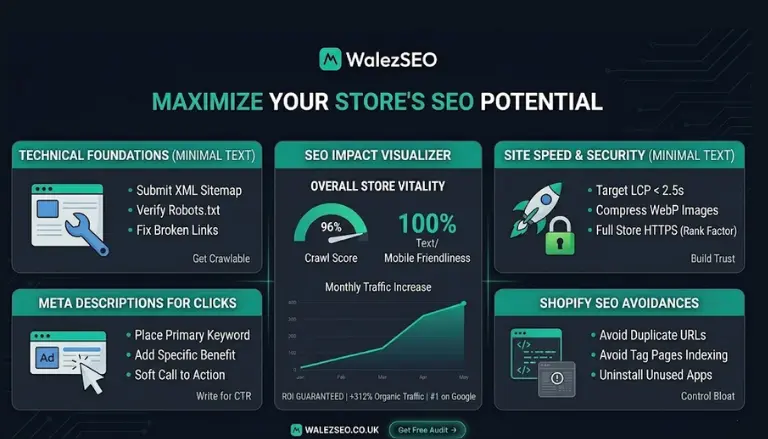
Both URLs are live, both are accessible, and both contain identical content. Google sees this as duplicate content, which dilutes the ranking potential of both pages. Shopify automatically adds canonical tags to point Google toward the /products/ version but these aren’t always implemented correctly and should be audited manually in Google Search Console.
Rigid URL structure
Unlike WordPress or a custom-built site, Shopify doesn’t let you remove the /collections/ or /products/ folder prefixes from your URLs. You can’t create a clean URL like /bags/tan-leather-bag/ it will always include the folder. This is a minor limitation rather than a major problem, but it’s worth knowing.
Auto-generated tag pages
Shopify creates filtered collection pages automatically /collections/bags/tagged/leather, /collections/bags/tagged/tan, and so on. At scale, these accumulate into hundreds of thin, near-duplicate pages that dilute your crawl budget and confuse Google about what your site is actually about. These pages need to be blocked from indexing.
App bloat
Every Shopify app you install adds code to your store. Some apps add significant JavaScript that slows your page load time. Slow pages rank lower and convert worse and many UK Shopify stores are running eight to twelve apps they don’t fully use.
Step 1 — Technical setup: get Google reading your store correctly
Before any content or keyword work has its full effect, your Shopify store needs to be technically sound.
Google Search Console set this up first
If it isn’t already connected, submit your store to Google Search Console at search.google.com/search-console. This is where Google tells you about indexing errors, manual penalties, and which of your pages are and aren’t appearing in search. Check it at least monthly.
Submit your Shopify sitemap it lives at yourstorename.co.uk/sitemap.xml so Google has a map of every page it should be crawling.
Fix your robots.txt
Shopify’s default robots.txt blocks the pages it should block cart, checkout, account pages. But you should verify that no important collection or product pages are being accidentally blocked. Any page that’s disallowed in robots.txt is invisible to Google.
Handle tag pages
Add <meta name=”robots” content=”noindex”> to your Shopify tag-filtered collection pages. This stops Google from indexing hundreds of thin, duplicate pages and focuses crawl budget on your important URLs instead.
Audit canonical tags
Run your store through Screaming Frog (the free version crawls up to 500 URLs) and check that canonical tags are pointing to the right versions of your product URLs. Any product appearing under both /products/ and /collections/[name]/products/ should have a canonical pointing to the /products/ version.
Choose a fast theme
Theme choice has a significant impact on Shopify page speed. Dawn (Shopify’s free default theme) is one of the fastest available. If you’re using a heavily customised premium theme with lots of visual effects and features, test it in Google PageSpeed Insights and check your Core Web Vitals. LCP (Largest Contentful Paint) should be under 2.5 seconds on mobile.
Step 2 — Keyword research for UK Shopify stores
UK-specific keyword research looks different from generic ecommerce keyword research because UK buyers search differently. Search volumes are lower than US equivalents, long-tail keywords carry more weight, and British English matters more than most guides acknowledge.
Target transactional long-tail keywords on product pages
“Running shoes” is dominated by Nike, New Balance, and Sports Direct. You will not rank for it on a new or mid-authority store. “Women’s waterproof trail running shoes UK size 6” is a different story entirely specific, transactional, and achievable.
Every product page should target one specific long-tail keyword that matches what a buyer actually types when they’re ready to purchase. Not what sounds good to you what your customers search for.
Use British English throughout
This sounds obvious and is still ignored in a surprising number of UK stores. Google’s algorithm understands geographic targeting and a store using American spelling (“color,” “optimize,” “aluminum”) sends mixed signals about its location. Use British English consistently across all copy, meta data, and alt text. Use GBP pricing in your descriptions. These are small signals that collectively build confidence in your UK relevance.
Find keywords with Google’s own tools
Before spending money on Ahrefs or Semrush, use free sources first:
- Type your product into Google and study the autocomplete suggestions
- Check the “People Also Ask” boxes on the results page — these are real buyer questions
- Scroll to “Related searches” at the bottom of the page
- Look at what your top-ranking competitors include in their title tags and H1s
Target collection pages for broader keywords
Your collection pages (Shopify’s equivalent of category pages) should rank for broader terms: “women’s leather bags UK,” “men’s waterproof jackets.” Your product pages rank for the specific variations within those categories. This is the hierarchy Google expects and it matches how buyers actually browse.
Step 3 — On-page SEO: optimise every page that matters
Product pages
Start with your top 20 to 50 bestselling products. Get these right before touching anything else. Each one needs:
- A unique, keyword-rich title tag — format: [Product Name] — [Key Detail] | [Store Name] under 60 characters
- A meta description under 155 characters that includes your keyword and a reason to click (free UK delivery, in stock, award-winning)
- A unique product description of 300 words minimum never use manufacturer copy. Write about who the product is for, what problem it solves, its key benefits, materials, sizing, and care
- Descriptive image alt text on every photo “tan leather crossbody bag with adjustable strap” not “IMG_4782”
- A clean URL Shopify lets you edit the handle: use /products/tan-leather-crossbody-bag not /products/product-1234
Collection pages
Most UK Shopify stores leave collection pages as bare grids of products with no text. This is a significant missed opportunity collection pages are where you rank for your most valuable category keywords.
Add 150 to 300 words of introductory copy at the top of each collection page. Explain what the collection covers, who it’s for, and what makes your range worth buying. Include your target keyword naturally in the H1 and first paragraph. This alone can move collection pages significantly in rankings.
Homepage
Your homepage should clearly communicate what your store sells, who it’s for, and where you’re based (UK). Include your primary brand keyword in the H1. Link prominently to your most important collection pages this passes authority downward through your site structure.
Step 4 — Fix the Shopify speed problems killing your rankings
Page speed is both a ranking factor and a conversion factor. A one-second delay in mobile load time reduces conversions by up to 20%. Most UK Shopify stores are far slower than they should be.
The highest-impact speed fixes:
Compress your images — This is the single biggest win for most stores. Product images uploaded at full camera resolution can be several megabytes each. Convert them to WebP format and compress them before uploading. Tools like Squoosh (free) or TinyPNG handle this in seconds.
Audit your apps — Open your Shopify admin, go to Apps, and ask honestly: am I actively using this? Every unused app that’s still installed is still loading code on your storefront. Remove anything you don’t need.
Use lazy loading — Shopify’s newer themes include lazy loading by default, which means images below the fold only load when a user scrolls to them. If your theme doesn’t include this, it’s worth adding.
Check your theme’s built-in features — Many store owners install apps for features (reviews, wishlists, recently viewed) that their theme already includes natively. Use built-in features over apps wherever possible.
Step 5 — Schema markup: unlock rich results in Google
Schema markup is structured data that tells Google exactly what type of content is on your page. For Shopify product pages, the most valuable schemas are:
Product schema — Displays your price, availability, and SKU directly in search results. Shopify includes basic product schema by default, but it should be verified and may need expanding.
Review/AggregateRating schema — Displays your star rating in search results. This is one of the most powerful click-through rate improvements available a result showing ★★★★☆ 4.8 (124 reviews) will consistently outperform identical results without ratings.
BreadcrumbList schema — Helps Google understand your site hierarchy and displays your breadcrumb trail in search results.
Use Google’s Rich Results Test tool (search.google.com/test/rich-results) to check whether your Shopify theme’s schema is being read correctly. If you need to expand it, Yoast SEO for Shopify or Schema Plus for SEO are solid options.
Step 6 — Content and blogging: the part most Shopify stores skip
Shopify has a built-in blog feature that most store owners either ignore or use sporadically. This is a significant missed opportunity.
A product-only store can only rank for transactional keywords searches from people already ready to buy. A store with a well-maintained blog can also rank for informational keywords searches from people earlier in the buying journey who haven’t chosen a brand yet.
Those informational visitors are some of your warmest potential customers. They’re researching before they buy. A helpful, well-written blog post that answers their question and links naturally to your relevant products puts your brand in front of them at exactly the right moment.
What to write about:
- Buying guides — “How to choose the right hiking boot for UK trails”
- Care and maintenance — “How to waterproof a wax jacket at home”
- Comparisons — “Running shoes vs trail shoes: what’s the difference?”
- Seasonal content — “Best lightweight jackets for British summer weather”
Each post should link naturally to relevant product and collection pages. This internal linking passes authority to your commercial pages and builds the topical depth Google increasingly rewards.
Step 7 — Internal linking: build a structure Google can follow
Internal links do two jobs: they help Google understand which pages are most important, and they help buyers navigate your store naturally.
Internal linking rules for Shopify stores:
- Your homepage should link to your most important collection pages
- Collection pages should link to featured or bestselling products
- Product pages should include a “You might also like” or “Complete the look” section linking to related products
- Every blog post should link to at least two or three relevant product or collection pages within the body content
- Use descriptive anchor text “shop our leather crossbody bags” not “click here”
A store with strong internal linking doesn’t just rank better, it also keeps buyers on the site longer, which improves your engagement signals and conversion rate simultaneously.
Step 8 — Backlinks: build the authority your competitors already have
Everything covered so far is on-page and technical work changes you make directly to your own store. Backlinks are different. They’re links from other websites pointing to yours, and they remain one of Google’s most powerful ranking signals.
Most UK Shopify stores have weak backlink profiles. This is often why stores doing everything else correctly still plateau in rankings; the domain authority simply isn’t there to compete.
Realistic link building for UK Shopify stores:
- Write a genuinely useful blog post or resource that other sites in your niche would want to link to
- Reach out to UK product review bloggers in your category for honest product coverage
- Submit your store to relevant UK directories and trade associations
- Use digital PR a newsworthy story, original data, or a campaign to earn mentions in UK publications
- Get listed on Google Shopping and ensure your product feed is clean and complete this surfaces your products in search in ways organic results alone don’t
How long does Shopify SEO take to work?
This is the question every UK store owner asks and the answer that wins nobody’s favour: it depends.
For most Shopify stores, meaningful ranking improvements start appearing between months three and six. Product page optimisations title tags, descriptions, alt text can move within four to eight weeks. Collection page and blog content improvements tend to take longer, three to six months, as Google needs time to recognise and reward topical authority.
Competitive product categories take longer. If you’re selling running shoes or supplements in the UK, you’re competing against brands with years of authority and thousands of backlinks. Breaking through meaningfully takes sustained effort, often nine to twelve months minimum.
The compounding effect is real though. A store that invests consistently in SEO for twelve months typically sees its cost-per-acquisition from organic traffic fall significantly over that period because the rankings keep delivering traffic without an ongoing cost attached to each visit.
Do I need a Shopify SEO agency or can I do it myself?
If your store has fewer than 100 products and you have time to learn, you can handle the basics yourself using this guide. Product descriptions, title tags, meta descriptions, image alt text, and blog content are all manageable without specialist knowledge.
The areas where specialist help earns its cost quickly:
- Technical auditing and fixes — crawl issues, canonical problems, schema implementation at scale
- Link building — the most time-intensive part of SEO and the hardest to do well without existing relationships and frameworks
- Scaling across a large catalogue optimising 1,000+ product pages requires systems and processes most store owners don’t have time to build
If organic search is genuinely important to your growth strategy, the economics of professional help tend to stack up within six to twelve months.
Ready to start ranking your Shopify store?
At WalezSEO, we work with UK ecommerce businesses to build Shopify SEO strategies that deliver consistent organic traffic and sustainable growth. From technical audits and product page optimisation to content strategy and link building we handle the work while you run your store.
Our ecommerce SEO services are built for UK online stores that are serious about reducing their dependence on paid ads and building something that compounds.
If your store is based in Derby or the East Midlands, our ecommerce SEO services in Derby are designed specifically for businesses like yours.
Not sure where to start? Get a free SEO audit. We’ll review your Shopify store and tell you exactly what’s holding your rankings back.
- Improve online sales with our professional ecommerce SEO services
- Strengthen rankings using advanced technical SEO services
- Optimise product pages through professional on-page SEO optimisation
- Expand globally with our international SEO services
- Improve content quality using SEO copywriting services
Frequently asked questions
Is Shopify good for SEO?
Shopify is a solid platform for SEO if you know its limitations. It handles the basics well: sitemaps, canonical tags, HTTPS but has structural quirks like duplicate product URLs and auto-generated tag pages that need manual attention. With proper setup, Shopify stores can rank very well in competitive UK markets.
Why is my Shopify store not showing up on Google?
The most common reasons are: pages not being indexed correctly, thin or duplicate product descriptions, poor site speed, and a weak backlink profile. Start by checking Google Search Console for indexing errors it will usually tell you exactly what’s wrong.
Do I need to pay for Shopify SEO apps?
Not necessarily. Shopify includes basic SEO functionality in every plan. Apps like Yoast SEO for Shopify or Smart SEO can help with schema and meta data at scale, but most small stores can manage without them initially. The priority should be fixing technical issues and improving content, not adding more apps.
How do I do keyword research for a Shopify store?
Start with Google autocomplete for your product categories, check “People Also Ask” and “Related searches” on results pages, and study what keywords your top-ranking competitors are targeting. Focus on long-tail, transactional keywords with clear buying intent rather than high-volume generic terms you can’t realistically rank for.
What’s the most important Shopify SEO fix for UK stores?
Write unique product descriptions in British English for your top-selling products. It’s the highest-impact improvement most stores can make quickly; it eliminates duplicate content issues, adds keyword-rich text, and directly improves the buyer experience that drives conversion.
How much does Shopify SEO cost in the UK?
It depends on what you need. Basic setup Google Search Console, sitemap submission, fixing canonical issues costs nothing but time. Professional Shopify SEO from a UK agency typically starts around £750 to £2,000 per month depending on store size and competition. For a realistic quote based on your store, contact us or request a free audit.